Enter password to view case study
CMS (CENTER FOR MEDICARE & MEDICAID SERVICES) • 2021-2023 • PORTAL DESIGN
MY ROLE
Lead UX Designer
CHANNELS
Web • Mobile
PLATFORM
ServiceNow, Wonder
ENGAGEMENT
Jan 2021 - Feb 2023 • 2+ years

THE PRODUCT
CMS Connect is a unified employee experience platform — replacing a fragmented IT portal with a single destination for tasks, knowledge, news, and support across the agency.
CMS Connect was built on Wonder, Intellective's own ServiceNow portal builder — the same product I designed the UX for. Building on Wonder rather than a custom ServiceNow implementation is a big part of why we could deliver in 10 weeks instead of years: the component library, theming system, and content management layer already existed, so I could focus on CMS-specific IA, content, and accessibility rather than building portal infrastructure from scratch.
MY ROLE
I was Lead UX Designer on this engagement. I worked alongside another UX professional with deep employee experience expertise from his time at ServiceNow — he led strategy and I led execution, owning the design across web and native mobile, running structured usability and navigation research with real CMS employees, and working closely with Intellective's engineering team to ship the first version in 10 weeks. The platform grew under my design ownership for over two years — from an IT service portal into a full employee experience platform.
THE PROBLEM
CMS had a federal workforce going fully remote overnight — and a portal only 13% of employees were using."
When the world went into pandemic shutdown in 2020, CMS — the agency administering Medicare, Medicaid, and the ACA — had to run entirely remotely overnight. Their existing IT service portal, where employees requested equipment and support, had only 13% adoption after 2+ years of development. What existed only handled IT equipment and service requests. For anything else — HR, department news, knowledge base — employees had to look elsewhere, hunting across separate systems with no single place to go.
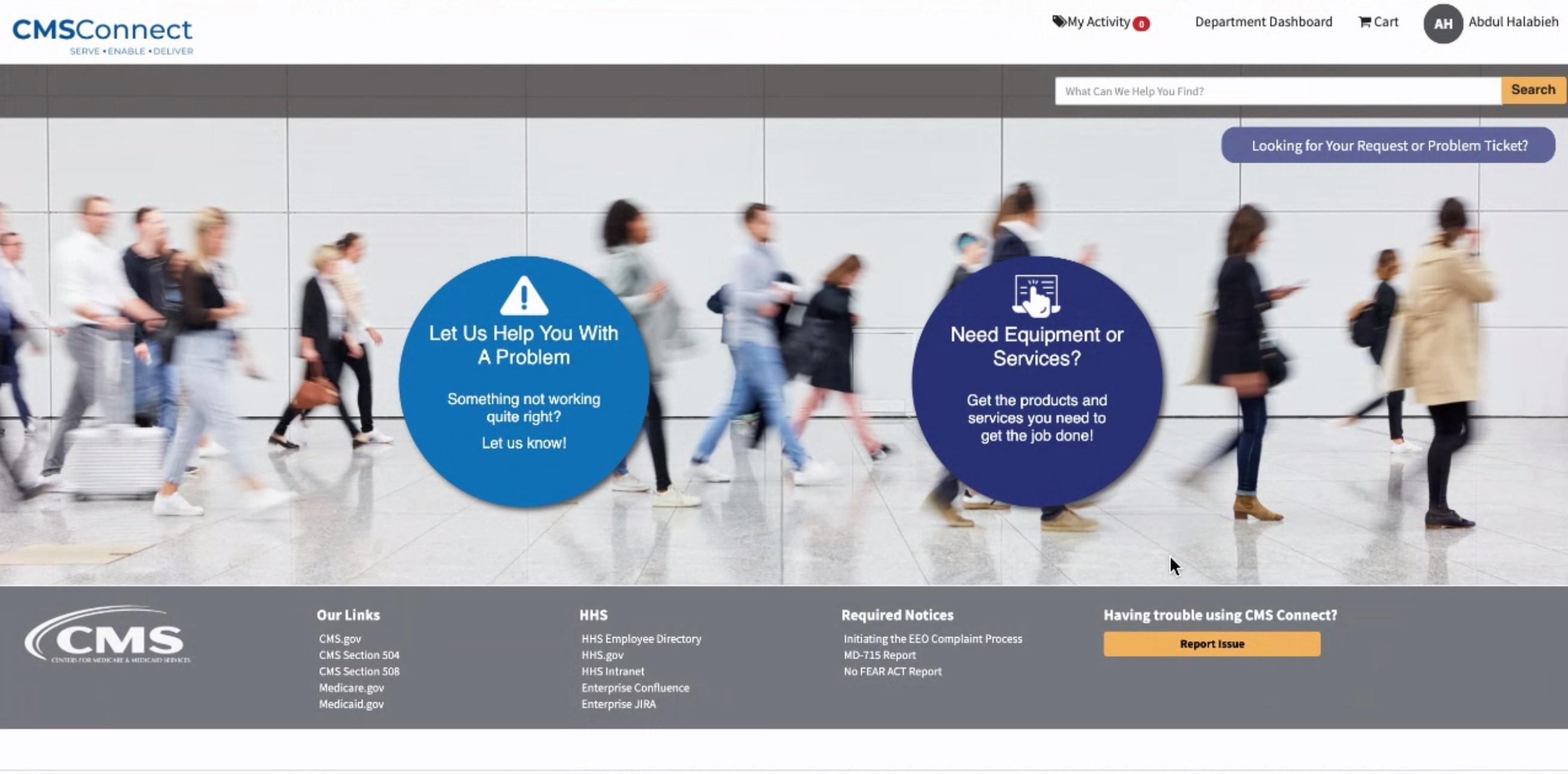
Before
MY APPROACH
I designed CMS Connect to bring everything employees needed into one place — not just IT requests, but HR, knowledge, and news — so CMS Connect could grow from there into a full employee experience platform over two years.
Everything employees needed was scattered across separate pages with no single landing view
Employees working remotely had no way to get hands-on IT help without an in-person visit

No way to see request status, and a page that still looked like out-of-the-box ServiceNow.

Before
The earlier request page was the out-of-the-box ServiceNow experience — a flat "State: Open" field with no sense of where a request actually sat in the approval chain. The layout and visual design also needed work to feel like part of CMS Connect rather than a default ServiceNow screen.

Solution
I redesigned the layout and visual design to match CMS Connect's design system, and added a multi-step request tracker showing exactly where a request sat across — so employees could self-serve status checks instead of emailing IT.
ADDITIONAL SCREENS
From an IT portal to a full employee experience platform
CMS Connect grew well beyond its original IT scope over two years — these surfaces show the breadth of what the platform became, built on the same foundation and component system established at launch.

Unified To-Do's
All tasks across every system surfaced in one list. No more hunting across Jira, ServiceNow, and email.

Knowledge Center
Employee-friendly knowledge categorization — targeted by role and department, with Latest, Most Viewed, and Top Rated filters. Designed to drive self-service and reduce IT ticket load.

Get Services
A browsable service catalog where employees could find the support they needed — IT services, HR, Workplace Services, and more — and submit a ticket without knowing which department to contact.

Profile
Employees could view their own profile or any colleague's — showing contact info, work location, team structure, and Things I Own. Designed to surface the right context whether you're viewing yourself or someone else.
MOBILE EXPERIENCE
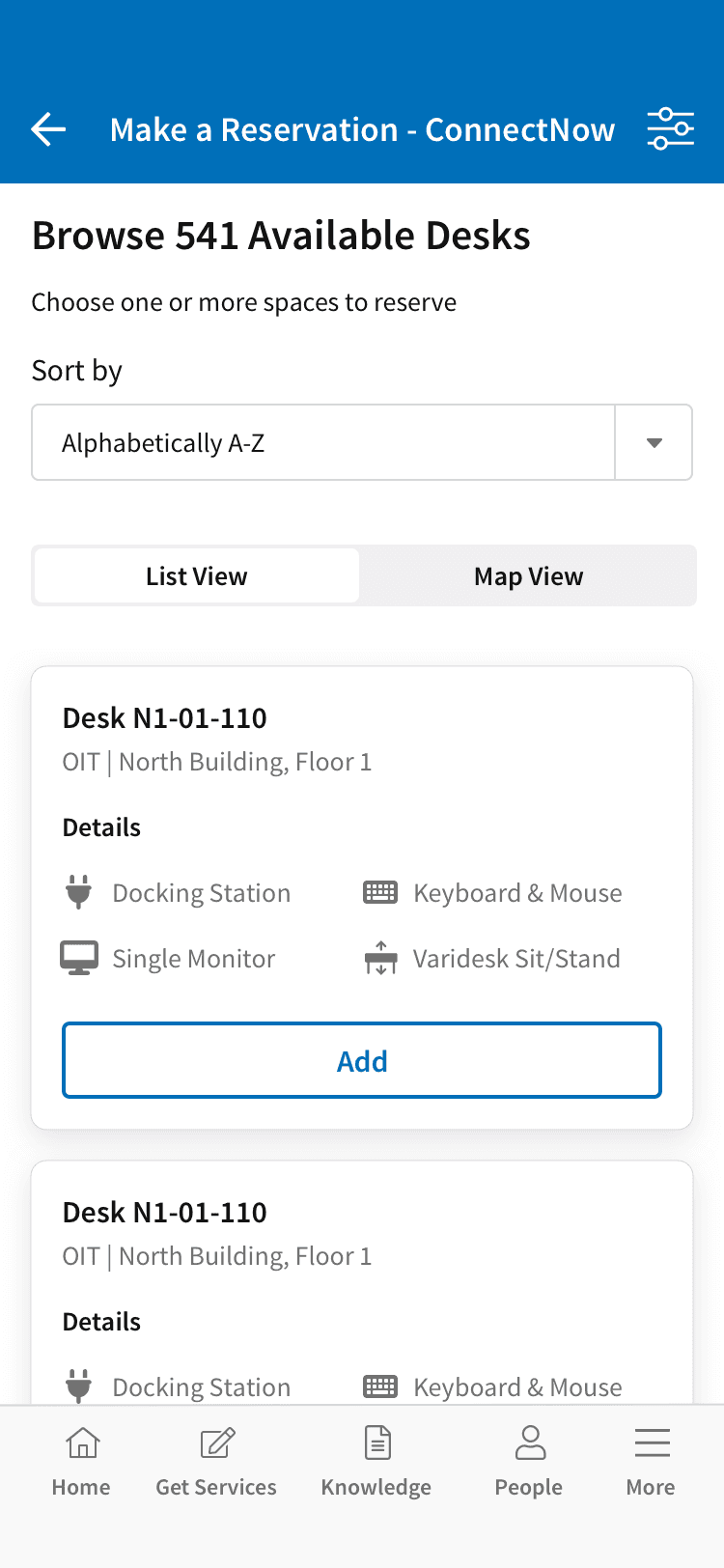
CMS Now Mobile — extending the portal to iOS and Android
CMS Connect wasn't web-only — I owned the design for CMS Now Mobile on iOS and Android, built on ServiceNow's Now Mobile platform with CMS-specific branding, navigation, and content.



THE OUTCOME
From 13% to 84% adoption in 2 months
The previous portal — built over 2+ years — had 13% adoption. CMS Connect reached 84% within 2 months of launch. The difference wasn't technology — it was information architecture, personalization, and genuine usability.
84%
Portal adoption
Within 2 months of launch — up from 13% on the old site
10 wks
Contract to delivery
MVP delivery time vs. 2+ years for the previous vendor
2+ yrs
Ongoing engagement
IT portal grew into full enterprise employee lifecycle platform